
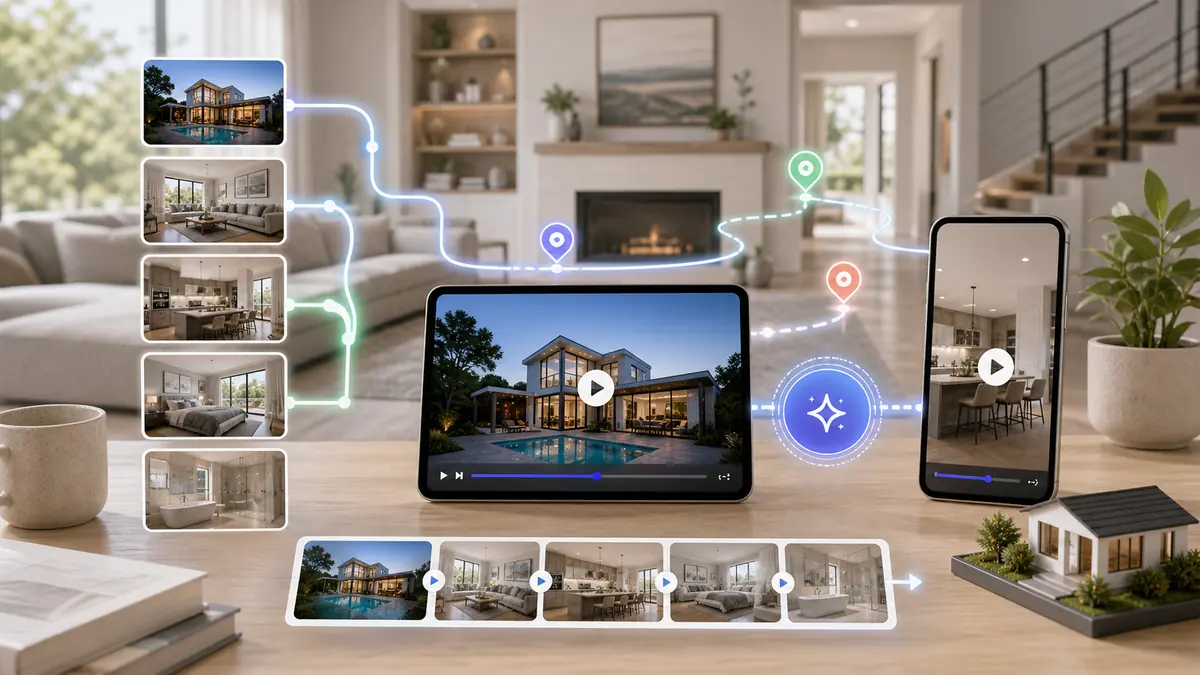
To create real estate video walkthroughs, upload 10-20 high-quality listing photos to an AI tool like ReelTourStudio. Arrange photos in logical order (exterior → living areas → bedrooms → outdoor). The AI automatically adds cinematic motion effects and transitions. Choose background music, add branding, and export in 1080p HD. Videos are ready in 5-15 minutes for MLS, Instagram, or TikTok.
A well-crafted video walkthrough can make the difference between a listing that sits and one that sells. Unlike static photos, walkthroughs let buyers experience the flow, layout, and feel of a property—all from anywhere in the world. Here's how to create walkthroughs that convert.
On this page
What Makes a Great Property Walkthrough
The best property walkthroughs tell a story. They guide viewers through a logical flow, highlight standout features, and create an emotional connection—all while keeping attention from start to finish.
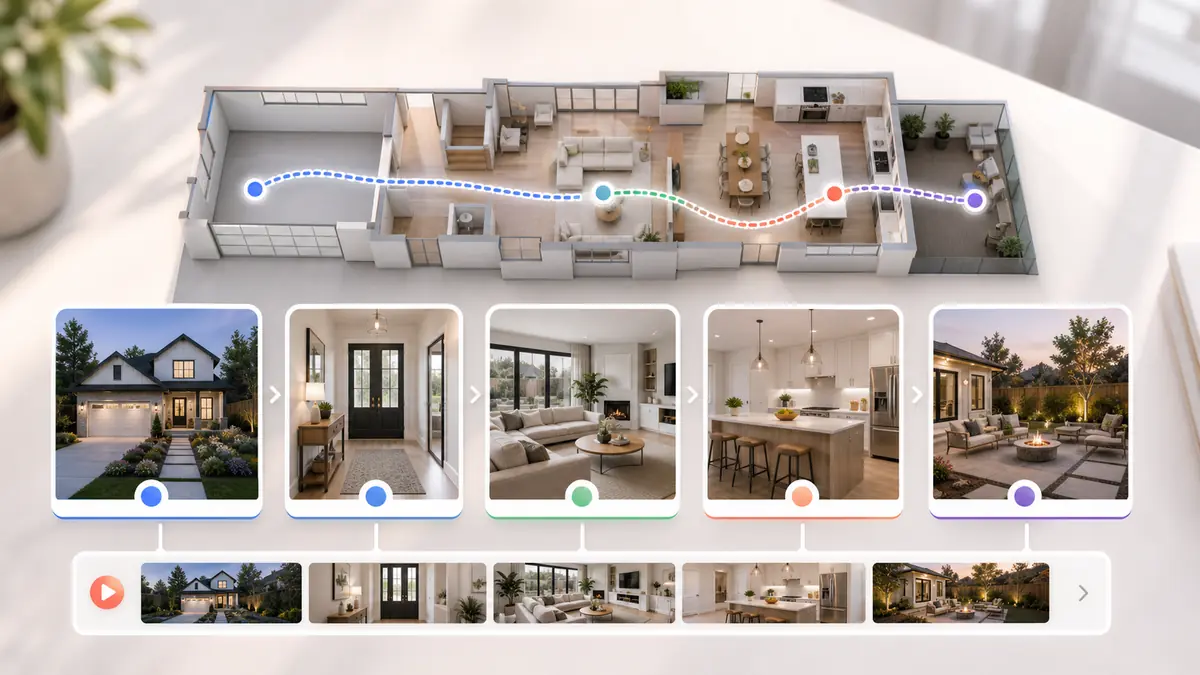
The Narrative Flow
Start with curb appeal, move through common areas, showcase bedrooms and baths, and end with outdoor spaces or key amenities. This mimics how buyers naturally tour a home.
Pacing and Duration
For full tours, aim for 1-3 minutes depending on property size. Each room should get 5-15 seconds. Too fast feels rushed; too slow loses attention. For social media, cut this to 30-60 seconds featuring only the highlights.
Photo-Based vs. Filmed Walkthroughs
Modern technology offers two approaches to creating walkthroughs, each with distinct advantages.
Traditional Filmed Walkthroughs
Using a camera (or smartphone) to film continuous footage of each room. Pros: Real movement and transitions. Cons: Requires skill, time, and often professional help to avoid shaky, amateur-looking results.
AI Photo-to-Video Walkthroughs
Using AI tools like ReelTourStudio to transform listing photos into cinematic video. Pros: No filming required, professional motion effects, consistent quality, and ready in minutes. Cons: Limited to what photos capture.
Creating Your Walkthrough with AI
Here's a step-by-step guide to creating professional walkthroughs from your listing photos.
Step 1: Gather Your Best Photos
Select 10-20 high-quality images that capture each major space. Shoot wide to show room layout. Include exterior shots for curb appeal.
Step 2: Arrange in Logical Order
Organize photos to create a natural tour: exterior → entryway → living areas → kitchen → bedrooms → bathrooms → backyard/amenities.
Step 3: Upload to ReelTourStudio
Upload your photos, and the platform will turn them into a more polished walkthrough with motion, pacing, and transitions that help the listing feel dynamic instead of static.
Step 4: Customize Your Style
Choose background music that matches the property's vibe. Select from our curated library of royalty-free tracks optimized for real estate.
Optimizing Walkthroughs for Different Platforms
The same walkthrough won't perform equally everywhere. Optimize for each platform.
MLS and Zillow
Use landscape format, 1-3 minutes, professional music. These buyers are already interested—give them comprehensive tours.
Instagram Reels
Portrait format, 30-60 seconds, trendy music. Hook viewers in the first 2 seconds. Focus on the "hero" shots.
TikTok
Same as Reels, but consider adding trending sounds or text overlays. Authenticity performs well here.
Common Walkthrough Mistakes to Avoid
Even great properties can suffer from poor video execution.
Too Long or Too Slow
Attention spans are short. Get to the good stuff quickly and keep the pace brisk.
Poor Photo Quality
Blurry, dark, or cluttered photos make for bad videos. Invest in professional photography or learn proper lighting techniques.
No Call-to-Action
Every video should end with a clear next step: "Schedule a showing," "Call now," or "Link in bio."
Start Creating Better Walkthroughs Today
Video walkthroughs are no longer optional—they're expected by modern buyers. The good news? You don't need expensive equipment or editing skills. With AI-powered tools, every agent can create professional walkthroughs in minutes. Your next listing deserves video.
Recommended next reads
AI real estate video generator from photos
See the photo-to-video workflow, formats, and plan limits before creating your next listing video.
Compare ReelTourStudio plans
Choose a subscription based on your monthly listings, photo limits, and video length.
AI real estate videos
Use ReelTourStudio to turn listing photos into professional real estate videos for MLS, Instagram, TikTok, YouTube, and listing pages.
Turn Listing Photos Into
Polished Property Videos.
Create branded real estate videos in minutes with ReelTourStudio. No filming, no editing, and no waiting on an outside production team.
Create your first videoKeep Reading
Related real estate video guides
How to Turn Real Estate Photos Into Video in 2026
Turn real estate photos into video with AI. Learn the best photo order, formats, uses, and workflow for creating listing videos from property photos.
Read guidetutorialsReal Estate Video Maker for Listing Videos in 2026
Use an AI real estate video maker to turn listing photos into polished property videos for MLS, Instagram Reels, TikTok, YouTube, and listing pages.
Read guidemarketingReal Estate Marketing Videos: How Agents Turn Listing Videos Into Leads
Learn how agents use real estate marketing videos across listings, social posts, email, seller updates, and ads without filming every property.
Read guide